Key takeaways:
- Automated user provisioning removes manual account setup and teardown from the employee lifecycle.
- Lingering access to company accounts can create real security risks. Deprovisioning accounts on employee termination mitigates these risks.
- The best version of this ties directly into HR data, so a hire date or termination date is the trigger, not a ticket someone remembered to file.
What automated user provisioning means
User provisioning is the process of setting up someone's access: creating their account, assigning the right permissions, and connecting them to the tools they need for their role. Deprovisioning is the reverse: removing access when they no longer need it, usually because they left the company or changed roles.
"Automated" means software handles both ends without a human manually creating accounts one by one. A new engineer's SSO login, email, and repo access get provisioned based on their role and department, usually through rules set up in advance: engineers get GitHub and the staging environment, sales gets the CRM, everyone gets Slack and email.
This is usually described as a pure identity and access management (IAM) problem, something that lives entirely inside tools like Okta or Entra ID. That's accurate, but it only covers half of what makes provisioning actually automatic: where the trigger comes from in the first place.
How automated user provisioning works
A typical automated provisioning setup runs on four steps:
- A trigger event happens. Someone is hired, promoted, or terminated.
- The system checks a policy. Role, department, and location determine what access that person should have.
- Accounts get created or revoked. The identity provider pushes those changes out to every connected app.
- Everything stays in sync. If someone changes teams, their access updates automatically instead of accumulating old permissions nobody remembers to clean up.
Step one is where most setups typically go manual again. The "trigger event" is supposed to be automatic, but if the identity platform doesn't know someone was hired until an admin manually adds them, the rest of the automation is really just automating steps 2 through 4. The actual bottleneck, a person noticing a change happened and telling the system about it, never went away.
The real cost of manual provisioning
Skip the automation entirely, and the pain is familiar to anyone who's run IT at a growing company. A new hire's start date arrives, and their laptop isn't set up, because ordering, imaging, and shipping a device takes coordination between HR, IT, and whoever's tracking start dates in a spreadsheet. Their email doesn't exist yet, so they spend day one watching someone else's screen instead of working. Multiply that by every new hire in a hiring spike, and IT spends entire weeks on account setup instead of anything that actually needs their judgment.
The other side is worse. About 31% of companies have former employees who accessed SaaS applications after leaving, according to a DoControl SaaS security report; large companies averaged 20 former employees with lingering access at any given time. All it takes is a single disgruntled employee, or one misstep, for this to turn into a major problem.
Why provisioning breaks when it's disconnected from HR data
The HR system is usually treated as just another "identity source" that an IAM platform syncs with, alongside Active Directory, Okta, and whatever else is in the stack. That framing treats HR data as an input among several when it should be the trigger.
The hire date and termination date already exist in payroll, entered once by the person actually running HR. Every provisioning system that treats this as a secondary sync source instead of the system of record is adding a translation layer, and translation layers are where lag creeps in. A new hire gets entered into the HRIS on Monday, but their IT ticket doesn't get filed until Wednesday. A termination gets processed in payroll on a Friday, but the offboarding checklist doesn't run until the following Monday, which is exactly the gap where that 31% figure comes from.
The fix isn't a faster sync. It's not syncing at all; provisioning runs directly off the payroll event itself, so no second system has to be told what already happened in the first.
What good automated provisioning covers beyond accounts
Software accounts, SSO, email, and SaaS tools are only half the picture for any company that issues laptops. A new hire's device needs to be enrolled, encrypted, and locked down to company policy before day one, just as their email needs to exist before day one. When someone leaves, that device needs to be wiped or locked the moment their accounts are suspended, not whenever IT gets around to the hardware side separately.
The problem is mobile device management (MDM) is usually treated as a completely separate system from account provisioning: different vendor, different admin console, and different trigger. That split is exactly how the security gap between "we suspended their email" and "we locked their laptop" opens up. Automated provisioning that only handles accounts and leaves devices as a manual follow-up step has only automated part of the risk.
Automated deprovisioning matters more than provisioning
Getting someone set up on day one is a productivity problem. Getting someone shut out on their last day is a security problem, and it's the one that shows up in a SOC 2 audit.
SOC 2's Security criteria spell this out directly: CC6.2 requires access to be authorized before it's granted, and CC6.3 requires access to be removed when a person's role or employment no longer justifies it. Auditors don't ask how fast new hires get their accounts. They ask for a timestamped log showing exactly when a departed employee's access was revoked, across every system, and whether that happened before or after their last day.
Good automated deprovisioning does three things in a single action: suspends the account, kills active sessions (so a login that's already open doesn't stay open), and removes group memberships so there's no half-revoked state where someone still shows up in a permissions list even though their login doesn't work. That single action, not three separate manual steps done by three different people, is what produces a clean audit trail instead of a scramble to reconstruct one after the fact.
Automated user provisioning in practice
Take a new hire starting Monday. Their manager processed the hiring in the HR system last week, with a department and start date attached. From there:
- The automated system opens their Okta account and assigns them to the right groups based on their department.
- It creates their Google Workspace account with Gmail, Calendar, and Drive access already configured.
- Their laptop gets enrolled and checked against device compliance policies, disk encryption, screen lock, and firewall, before it ships.
Now the same employee resigns three months later. On their last day:
- The account is suspended.
- Active sessions end.
- Group memberships clear out.
- The device locks.
All from the termination date already sitting in payroll. Nobody has to file a ticket, and nobody has to remember to check a box.
How Warp automates user provisioning
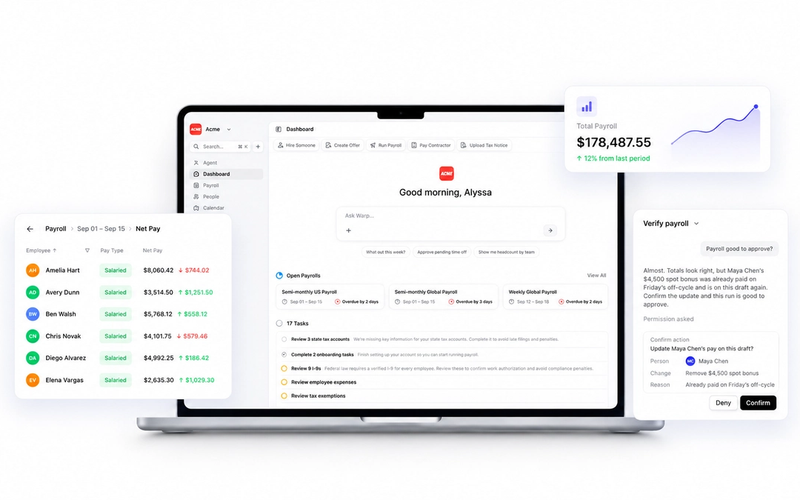
Thousands of fast-growing companies trust Warp to stay compliant while they scale, and that same "let payroll be the source of truth" thinking is why Warp Fabric doesn't treat provisioning as an IAM add-on. Hire and termination dates already live in Warp's payroll data. Warp Fabric uses that same record to provision and deprovision Okta, Google Workspace, and 6,500+ connected apps, plus the employee's device. There's no second system to keep in sync, because there's only one system of record to begin with.
Frequently Asked Questions
What's the difference between user provisioning and deprovisioning?
Provisioning is setting up someone's access when they join or change roles: creating accounts, assigning permissions, connecting the tools they need. Deprovisioning is the reverse, removing that access when they leave or no longer need it. Automated systems should handle both with equal urgency, though deprovisioning carries the higher security stakes.
Is automated user provisioning the same as SCIM?
No, though they're related. SCIM (System for Cross-domain Identity Management) is a technical standard that defines how identity data gets exchanged between systems, like a common language two platforms use to talk about user accounts. Automated user provisioning is the broader outcome; SCIM is one protocol that can help systems achieve it. A platform can automate provisioning without SCIM, and supporting SCIM doesn't automatically mean provisioning is fully automated end to end. SCIM support also varies widely by app vendor: some implement it fully, some only partially, and many SaaS tools don't support it at all. That gap on the app's side limits how automated provisioning can realistically be for a given tech stack, no matter how capable the identity provider is.
What triggers automated user provisioning?
Typically a change in an authoritative system, most often an HRIS: someone is added as a new hire, their role changes, or their termination date is entered. The strongest setups use that HR event directly as the trigger, rather than waiting for a second system (an IAM tool or a manually filed IT ticket) to be told the change happened.
Does automated provisioning cover physical devices, not just software accounts?
It should, though most provisioning tools only handle software accounts and leave device management (laptops, phones) as a separate manual process. That split creates a real gap: an employee's accounts might be suspended on their last day while their company laptop, still logged in, isn't locked or wiped until someone remembers to handle it separately.
What are the main benefits of automated user provisioning?
Faster, more consistent onboarding (new hires get access on day one instead of waiting on IT), reduced security risk (former employees lose access immediately instead of lingering for weeks), and a cleaner audit trail for compliance frameworks like SOC 2, since every access change is logged automatically instead of reconstructed after the fact.
How does automated user provisioning help with SOC 2 compliance?
SOC 2 auditors look for evidence that access is granted and revoked promptly and consistently. Automated provisioning produces a timestamped log of exactly when each account was created or revoked, tied to a specific hire or termination event, which is far easier to hand an auditor than piecing together access changes from ticket histories across multiple admins.