
TL;DR: Employee onboarding is the process of legally setting up, equipping, and getting a new hire productive. For a startup, that means four stages: collecting paperwork before the start date (offer letter, I-9, W-4, state forms), setting up payroll and benefits, provisioning tools on day one, and a 30-60-90 day plan. Use the checklist below to cover each step.
A new hire onboarding checklist ensures you collect every required form, meet every compliance deadline, and get your employee set up in payroll before their first day. Missing a single step, like a late I-9 or a missing state withholding form, can trigger penalties that range from $288 to $2,861 per violation.
This onboarding checklist can work for a company of any size, but may be most helpful for startup founders who are handling onboarding themselves, possibly for the first time, and need to know exactly what to do and in what order.
Before the start date: pre-boarding (1 to 2 weeks out)
The work starts the moment your candidate signs the offer letter. Pre-boarding is everything that happens between acceptance and their first day.
→ Send top tier offer letters with our generator
Send the offer letter and employment agreement
Your offer letter should include the job title, compensation, start date, employment status (at-will in most states), reporting structure, and a summary of benefits eligibility. For guidance on what to include and common mistakes to avoid, see our guide on how to write a startup offer letter. If you need a template, check out our free Offer Letter Generator to create one in minutes.
If you're offering equity, include the stock option grant details or reference a separate equity agreement. The offer letter and the equity agreement should be separate documents. Before finalizing grant sizes, model the impact on your cap table with our free Equity Dilution Calculator.
Determine worker classification
Before onboarding, confirm that the role is correctly classified as a W-2 employee (not a 1099 contractor). Misclassification can result in back taxes, penalties of $5,000 to $25,000 per violation for willful misclassification in states like California, and potential legal liability. The IRS uses a multi-factor test examining behavioral control, financial control, and the type of relationship.
Check state registration requirements
If this is your first employee in a new state, you'll need to register with that state's tax agencies before running payroll. This includes state withholding tax registration, state unemployment insurance (SUI) registration, and potentially local tax registrations in cities like New York City, Philadelphia, or San Francisco.
This process can take days to weeks if done manually. Warp automates state tax registration when you add an employee's work location. Most registrations complete within 5 to 10 business days.
Set up equipment and access
Order and configure the employee's laptop, set up their email and Google accounts, and provision access to relevant tools. If you're using an MDM (mobile device management) solution, enroll their device. Make sure building access, parking, or co-working space memberships are arranged if applicable. With Warp Agent, you can set up a routine that orders equipment and creates accounts automatically when a candidate accepts their offer.
Day one: New employee required paperwork checklist
Federal and state law require specific forms to be completed by the employee's first day or within a few days of starting. Missing these deadlines can result in fines.
Form I-9: Employment Eligibility Verification
Deadline: Section 1 must be completed by the employee on or before their first day of work. Section 2 (employer verification of identity documents) must be completed within three business days of the start date.
Which form to use: Use the 01/20/25 edition of Form I-9. Since August 1, 2026, it is the only edition allowed for new hires. It expires 05/31/2027.
What you need: The employee presents original documents from the USCIS List of Acceptable Documents. Most employees provide a passport (List A) or a driver's license plus Social Security card (List B + List C).
Remote employees: If the employee works remotely and you have no staff near them, you can use an authorized representative to complete Section 2 in person. As of 2026, E-Verify employers can use the alternative document examination procedure for remote employees.
Penalty for non-compliance: $288 to $2,861 per form for paperwork violations. Knowingly hiring or continuing to employ an unauthorized worker carries separate penalties that escalate with each offense, from $716 to $5,724 per worker for a first offense up to $28,619 per worker for third and later offenses.
How Warp helps: Warp runs the I-9 workflow for you. Employees complete Section 1 and upload their documents in Warp, you review them and complete Section 2, and Warp generates a compliant Form I-9 with an audit trail of every step. Outstanding I-9 tasks show up on your dashboard so nothing slips past the three-day deadline.
Form W-4: Employee's Withholding Certificate
Deadline: On or before the first day of work.
The W-4 determines how much federal income tax to withhold from the employee's paychecks. The employee fills it out. You keep it on file (do not send to the IRS). If the employee doesn't submit a W-4, you must withhold as if they claimed single with no adjustments.
State withholding forms
Most states have their own withholding form equivalent to the federal W-4. Some states accept the federal W-4. Others require their own form. For example, California requires Form DE 4, and New York requires Form IT-2104. Your payroll system should track which state-specific forms are required based on the employee's work location.
See our guide on state income tax withholding for remote workers for the full breakdown of which state gets the tax and how reciprocity agreements work.
Direct deposit authorization
Collect banking information for direct deposit. Most states allow employers to require direct deposit, but some (including California, Kansas, and Missouri) require employers to offer an alternative payment method.
Onboarding compliance deadlines at a glance
| Timing | Task | Penalty |
|---|---|---|
| Before start date | Send offer letter, confirm classification, register in new states | Varies by state. Late registration can trigger back taxes + penalties |
| Day 1 | I-9 Section 1, Form W-4, state withholding form, direct deposit auth | I-9: $288 to $2,861 per form |
| Within 3 business days | I-9 Section 2 (employer document verification) | Same I-9 penalties as above |
| Within 20 days | Report new hire to state directory | $25/employee, up to $500 for conspiracy |
| Within 30 days | Complete benefits enrollment | May lose enrollment window, employee goes uncovered |
| First payroll | Verify withholdings, deductions, and direct deposit accuracy | Incorrect withholding creates liability with state agencies |
| Ongoing | Track state filing deadlines, labor law postings, compliance changes | Varies. Late state filings: $50 to $250+ per employee per quarter |
First week: payroll and benefits setup
Enter the employee in your payroll system
Add the employee to your payroll system with their personal information, work location, compensation details, tax withholding elections (from W-4 and state forms), direct deposit information, and benefit deductions.
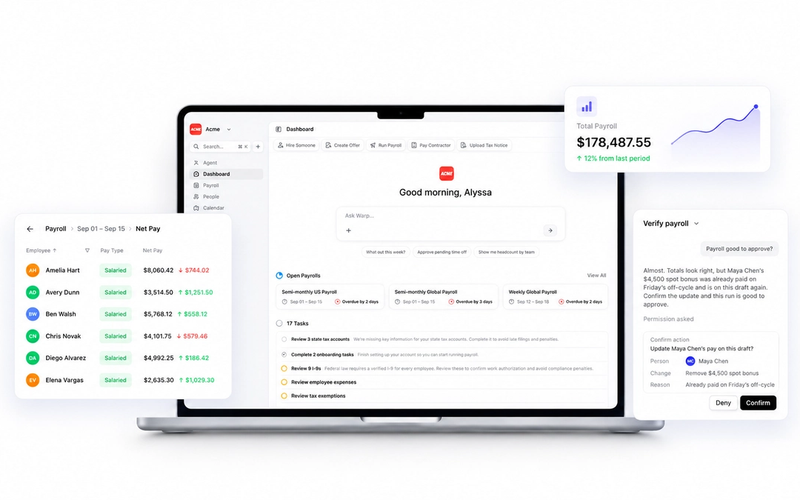
If you're using Warp, employees complete this process themselves through a self-service portal in under 10 minutes. Tax documents, direct deposit, and benefits enrollment are all handled in one flow.
Report the new hire to the state
Deadline: Within 20 days of the hire date in most states (some states require reporting within 10 or 15 days).
Federal law requires employers to report new hires to the state directory of new hires for child support enforcement purposes. The information required is typically the employee's name, address, Social Security number, and the employer's name, address, and EIN.
Penalty for non-compliance: Up to $25 per employee for late reporting, escalating to $500 if the failure results from conspiracy between employer and employee.
Enroll in benefits
If your startup offers health insurance, dental, vision, 401(k), HSA/FSA, or other benefits, the employee typically has 30 days from their start date to enroll. Some carriers require enrollment within a shorter window.
Warp handles benefits enrollment during onboarding with elections synced directly to carriers via EDI. Employees choose their plans during the same onboarding flow where they complete tax documents and direct deposit setup.
Workers' compensation
Confirm that your workers' compensation policy covers the new employee and their work state. If you're hiring in a new state, you may need to add that state to your policy. Workers' comp requirements vary by state. Texas and South Dakota don't require it for most private employers. All other states do.
First 30 days: complete the onboarding loop
Verify I-9 document expiration
If the employee presented a document with an expiration date (like an Employment Authorization Document), set a calendar reminder to reverify before it expires. Do not reverify unexpired documents. Demanding additional or different documents beyond what the employee initially presents may violate anti-discrimination provisions.
Confirm first payroll processed correctly
After the first payroll run, verify that federal and state withholdings match the employee's W-4 and state form elections, benefit deductions are correct, direct deposit went to the correct account, and year-to-date totals are accurate (especially important for mid-year hires who had previous employment).
Provide employee handbook
If you have an employee handbook (you should), provide a copy and have the employee acknowledge receipt in writing. The handbook should cover PTO policies, at-will employment status, anti-harassment policies, and other workplace standards.
Set up ongoing compliance tracking
For multi-state employers, each new hire can trigger ongoing compliance obligations: quarterly state tax filings, annual reporting, updated labor law postings, and state-specific requirements like California's pay data reports or New York's sexual harassment training mandates. Your payroll platform should track and automate these. If it doesn't, you need a system to monitor them manually.
→ Download our 2026 Payroll Compliance Calendar
The complete onboarding checklist
Here's every item in one place. Check them off as you go.
Pre-boarding (before start date):
- [ ] Send and collect signed offer letter
- [ ] Confirm worker classification (W-2 vs 1099)
- [ ] Register with state tax agencies if hiring in a new state
- [ ] Order and ship equipment
- [ ] Provision email, Slack, and tool access
- [ ] Schedule orientation meetings with team
- [ ] Prepare any required labor law postings (physical or digital)
Day one:
- [ ] Complete I-9 Section 1
- [ ] Collect Form W-4
- [ ] Collect state withholding form (if applicable)
- [ ] Collect direct deposit authorization
- [ ] Complete I-9 Section 2 (within 3 business days)
First week:
- [ ] Enter employee in payroll system
- [ ] Report new hire to state directory
- [ ] Begin benefits enrollment window
- [ ] Verify workers' compensation coverage for work state
- [ ] Assign manager and schedule 1-on-1
First 30 days:
- [ ] Confirm first payroll processed correctly
- [ ] Complete benefits enrollment
- [ ] Provide and acknowledge employee handbook
- [ ] Set up compliance tracking for ongoing state obligations
- [ ] Conduct 30-day check-in
How Warp automates the onboarding process
Most of the manual steps above exist because traditional payroll platforms were built to digitize paperwork, not eliminate it. Warp takes a different approach.
When you add a new employee in Warp, they receive a self-service onboarding link. In under 10 minutes, they complete tax documents (W-4, state forms), set up direct deposit, enroll in benefits (health insurance, 401(k), HSA/FSA), and sign any required agreements.
On the employer side, Warp automatically registers your business in new states when you add an employee's work location, configures the correct withholdings based on work state and residence state, syncs benefits elections to carriers via EDI, and reports the new hire to the state directory.
The result: new employees show up on day one fully configured in payroll, benefits, and compliance systems. No government portals. No paper forms. No manual data entry.
Warp is the only AI-native HR and payroll platform built for ambitious companies. Every company gets a dedicated Account Manager and Benefits Advisor included to guide them through payroll setup, multi-state expansion, and benefits selection.
Frequently Asked Questions
What forms are required for onboarding a new employee?
At minimum, you need Form I-9 (employment eligibility), Form W-4 (federal withholding), a direct deposit authorization, and any state-specific withholding forms. If you offer benefits, you'll also need benefits enrollment forms. Some states require additional forms like emergency contact information or acknowledgment of certain labor law notices.
How long should the onboarding process take?
The compliance paperwork should be completed within the first three business days (driven by the I-9 deadline). Total onboarding, including benefits enrollment and system setup, typically takes one to two weeks for traditional processes. With automated onboarding platforms like Warp, employees can complete the entire process in under 10 minutes.
What happens if I miss the I-9 deadline?
I-9 violations carry penalties of 288 to $2,861 per form. Since March 2026, ICE treats many common errors as substantive violations that can be fined without a chance to correct them. If ICE (Immigration and Customs Enforcement) audits your records and finds missing or incomplete I-9s, each deficient form is a separate violation.
Do I need to register in a new state for one remote employee?
In most cases, yes. A single employee working in a state where you're not registered creates a payroll tax nexus that triggers registration requirements for state withholding tax and unemployment insurance. Some states have de minimis exemptions, but most do not.
What is the penalty for not reporting new hires?
Federal law requires new hire reporting to the state directory within 20 days (some states require faster reporting). Penalties are $25 per employee for late reporting and up to $500 if the failure results from conspiracy between employer and employee.
Can I use the same onboarding checklist for contractors?
No. Independent contractors do not complete I-9, W-4, or benefits enrollment forms. For contractors, you collect a Form W-9 and any required contractor agreements. The onboarding process is simpler but the classification decision is critical, since misclassifying an employee as a contractor carries significant penalties.