
Open enrollment is the yearly reminder for companies to reconsider what they offer employees. It’s also a good time to reconsider how they deliver it.
$28,303 is the average annual premium for employer-sponsored family health coverage in 2026.
KFF’s October 22 Employer Health Benefits Survey found that family premiums rose 5% this year. Workers are paying an average of $7,471 toward family coverage, up 9%. At companies with fewer than 200 employees, that contribution averages $9,687.
Employers feel it too. SHRM’s October survey found that 57% of HR professionals named controlling benefits costs as their top open-enrollment priority. Just 5% pointed to simplifying plan choices.
The focus on cost makes sense. But there’s another cost hiding in the renewal process: the work required to administer everything once the plans are chosen.
The plan is only half the employee experience
For employees, open enrollment is simple. Review your options, make your elections, get back to work.
For the People team, it rarely is. Elections have to reach the carriers. Payroll deductions have to update correctly. New hires need enrollment windows, qualifying life events need processing, and someone has to reconcile the numbers when a carrier invoice doesn’t match payroll.
Each step is manageable alone. The problem is how often someone has to move information between systems or catch an error before an employee does.
Take an employee who gets married and adds a spouse to their health insurance. In a connected system, that event triggers enrollment, updates the records, notifies the carrier, and adjusts the deduction. The People team can see it happen and step in if needed.
In a fragmented setup, HR checks the submission, confirms the carrier received it, verifies the effective date, updates the deduction, and makes sure the next payroll reflects it.
The employee sees one life event. The People team sees five potential places where something could go wrong. And when systems don’t communicate, employees are the ones who find the errors in their paychecks.
The cost of benefits administration isn’t just the software bill
A platform that costs less per employee isn’t necessarily cheaper. The real cost includes the hours your team spends working around the software: reconciling a carrier invoice, checking that deductions started on time, chasing an enrollment that never went through.
Those hours rarely show up in the software budget. They sit inside a People team workload that already includes hiring, onboarding, employee relations, and compliance.
Five things to audit before you renew
You don’t need a six-month technology assessment to figure out whether your benefits software is working. Open enrollment tends to expose the problems on its own. The trick is paying attention to the work your team has gotten so used to doing that nobody questions it anymore.
Here are five places to look.
1. Where does someone still have to move information by hand?
Think about what happens after an employee makes their benefits elections. The information has to get to the carrier, their coverage has to take effect on the right date, and their payroll deductions have to reflect what they selected.
Now think about how much of that process requires someone from HR.
Maybe your benefits platform sends enrollment information to the carrier automatically, but someone still has to export a report and manually update payroll deductions. Maybe the systems are technically connected, but your team checks everything against a spreadsheet because the integration has caused problems before.
Those workarounds are easy to accept when they only take a few minutes. But they add up with every new hire, qualifying life event, and open enrollment cycle.
There’s a difference between work that requires someone’s judgment and work that requires someone to copy information from one place to another. Your HR software should be reducing the second kind.
What to check: Follow one employee’s benefits election from submission through their first paycheck with the new deduction. Count every manual touchpoint along the way, including the steps your team takes just to confirm that everything worked.
2. How do you find out when something goes wrong?
An employee gets their first paycheck after open enrollment and notices their health insurance deduction is higher than what they selected.
They reach out to HR, who checks the benefits platform. The election looks correct. Payroll shows a different amount. Now someone needs to figure out when the numbers stopped matching, whether the employee was overcharged, and how to correct it.
The bigger issue is that the employee found the problem before HR did.
Benefits administration involves enough moving parts that mistakes will happen. An employee might miss an enrollment deadline. A carrier might reject an enrollment file. A qualifying life event might have an effective date that requires special handling.
What matters is whether your team has a reliable way to find those issues before they affect someone’s coverage or paycheck.
Some systems flag discrepancies and give administrators a clear way to investigate them. Others leave HR to discover problems through employee complaints, carrier notices, or a manual review at the end of the month.
What to check: Pull up the last few enrollment or deduction errors your team handled. How was each one discovered? How long did it take to resolve? If the employee hadn’t said anything, when would your team have caught it?
3. Who picks up the phone when something goes wrong?
Say an employee adds their spouse to their health insurance after getting married. They submit everything on time, but a few weeks later, the spouse tries to fill a prescription and learns their coverage isn’t showing as active.
HR contacts the benefits administrator, who says the enrollment was sent to the carrier. The carrier says it doesn’t have the correct effective date. The employee wants an answer, and your People team is now responsible for getting three different parties to agree on what happened.
This is where having multiple providers becomes especially frustrating.
The problem isn’t necessarily that one vendor made a mistake. It’s that nobody seems responsible for seeing the issue through to the end. Each provider can say its part of the process worked, while the employee is still without the coverage they expected.
And HR is left coordinating the resolution, often without the ability to make the correction directly.
Before renewing, it’s worth understanding what support you’re actually paying for. Some providers will help investigate and resolve issues across systems. Others limit their responsibility to what happens inside their own platform.
What to check: Look at your current support arrangement. When an issue involves both payroll and benefits, who takes ownership? Does someone stay involved until it’s resolved, or does your team have to open separate tickets and keep following up?
4. What does the experience actually look like for employees?
A People team might spend months negotiating benefits, reviewing plans, and working with a broker to put together a competitive package. Then open enrollment arrives, and an employee can’t figure out whether their preferred doctor is in-network or what they’ll actually pay when they add a dependent.
They send HR a message. Then another one. Eventually, someone schedules a call to walk them through information that was technically available in the enrollment portal all along.
That’s not necessarily a failure of the benefits package. It’s a problem with how employees access and understand it.
The stakes are getting higher. KFF’s 2026 Employer Health Benefits Survey found that workers at smaller companies contribute an average of $9,687 annually toward family health coverage. That’s a significant household expense, and employees need enough information to make the right decision for themselves.
The experience doesn’t end when enrollment closes, either. Employees still need to find their coverage information, add dependents, report life events, and understand why a deduction changed.
If every routine question ends up in HR’s inbox, the self-service experience probably isn’t doing enough.
What to check: Go through open enrollment as though you’re an employee who doesn’t already understand the company’s benefits. See how easily you can compare plans, find out what you’ll pay, make a change, and confirm that it went through. Then look at the questions employees asked HR most frequently this enrollment season. Those are good places to start identifying what’s missing.
5. How much does your benefits setup really cost?
The number on your software invoice is a good place to start, but it won’t tell you what you’re spending to keep everything running.
Say your People Ops manager spends three hours every pay period checking deductions against enrollment records. That’s roughly 78 hours a year on one task, assuming biweekly payroll. And that’s before anyone has to investigate a discrepancy.
Now add the time spent following up with carriers, correcting employee records, troubleshooting integrations, and answering questions that employees couldn’t resolve through the platform.
Your team might consider those tasks part of normal benefits administration. Finance probably doesn’t see them as a separate cost because they’re buried inside someone’s salary.
But the company is paying for that time regardless.
This is also where the lowest software quote can become misleading. A cheaper platform may require more administrative work, more external support, or additional tools to cover functionality that another provider includes.
The reverse can be true, too. A more expensive platform doesn’t automatically save enough time to justify the price.
You need to understand what your team is actually doing before you can make that comparison.
What to check: For one month, track the time your team spends on recurring benefits administration, troubleshooting, and vendor follow-ups. Add that to your software and service costs. When evaluating another provider, ask which tasks would genuinely disappear, which would become easier, and which would still belong to your team.
Your 2027 benefits review should include the systems behind it
A lot can change between benefits renewals. Maybe you went from 20 employees to 100. Maybe you hired in six new states. Maybe the person who originally set up your benefits system left two years ago, and now nobody is entirely sure why certain things work the way they do.
Those changes are worth thinking about as you plan for 2027.
Open enrollment has a way of exposing all the little workarounds a People team has gotten used to. The spreadsheet that tracks enrollment exceptions. The reminder to check deductions after every new hire. The Slack message to the one person who knows how to fix a carrier issue.
At some point, those workarounds become part of the job, even though they probably shouldn’t be.
You don’t have to replace your software just because it’s renewal season. But if your team is spending hours making sure the systems you already pay for are doing their jobs, that’s worth putting on the agenda.
Healthcare costs are largely outside a People team’s control. How much time the team spends administering those benefits is something you can do something about.
Considering a change before 2027?
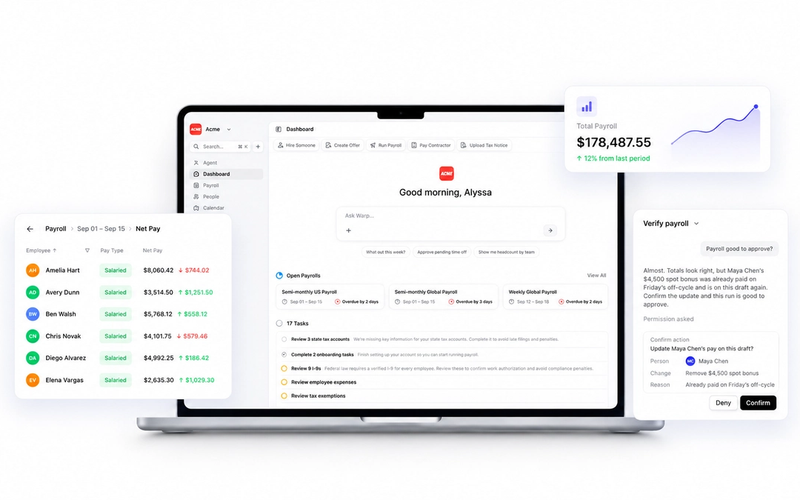
Warp brings payroll, HR, benefits administration, and compliance workflows into one platform. Our team can help assess your existing benefits setup, explain what can transfer, and build a migration plan around your renewal and payroll schedule.