
If you've searched for paperless HR software, you've probably found a dozen posts telling you to "invest in an e-signature tool" and "store records electronically." That's true, and also not particularly useful. Going paperless in HR touches five or six different document types, each with its own compliance requirements, and treating it as one checklist item is how companies end up half-digital: e-signatures for offer letters, a shared drive for everything else, and no real system connecting them.
What "Paperless HR" Actually Means
Paperless HR isn't a single switch. It's the sum of every document your company generates about an employee, from the offer they sign before they're even hired to the records you're legally required to keep years after they leave. That includes:
- Offer letters and employment agreements
- I-9 identity and work authorization documents
- Employee handbooks and policy acknowledgments
- Onboarding paperwork (tax forms, direct deposit, benefits elections)
- Personnel records and retention files
Most companies go paperless one piece at a time. They add DocuSign for offer letters, keep I-9s in a binder because "that's how it's always been done," and store the handbook in a Google Drive folder nobody can prove anyone actually read. Each piece is digital. None of it is connected, and connection is what actually saves time and reduces risk.
The Documents That Actually Need to Go Paperless
Offer letters and e-signatures
This is usually the easiest place to start. A candidate who signs a legalese PDF isn't getting a great first impression of your company, and manually tracking who's signed what in an inbox doesn't really improve efficiency either.
However, a valid e-signature isn't just a checkbox that says "signed." For it to hold up, you need a record of who signed, when, from what device, and from what IP address. That audit trail is what makes the signature defensible if it's ever questioned, not the signature itself.
I-9 verification and work authorization
I-9 is a federal requirement for nearly every US employer hiring W-2 employees, and it's also the document most companies handle worst on paper. Someone has to collect identity documents, verify them, complete Section 2 within three business days of the employee's start date, and retain the form correctly. Miss a step, and you have a compliance gap that's expensive to unwind. Our guide on remote I-9 verification covers the specific timing and documentation rules for distributed teams, which is where most of the mistakes happen.
Handbooks, policies, and acknowledgment tracking
Uploading your handbook to a shared drive isn't paperless HR. It's a PDF nobody can prove anyone read. If an employee disputes a policy later, or a regulator asks whether your harassment training was actually completed, "it's in the shared folder" isn't an answer. You need a timestamped record of who was assigned what, and who acknowledged it.
Employee records and retention
Every document above needs somewhere to live that isn't a folder named "HR - misc." Retention requirements vary by document and by state (I-9s, tax records, and benefits elections all have different minimum retention periods), so the records need to be organized by employee and by type, not just archived.
Why Go Paperless
Beyond the arguments that it saves money, saves time, and is better for the environment, going paperless with the right system is important for:
- When someone asks for proof. An auditor, a regulator, or a departing employee's lawyer won't accept "we think everyone signed it." They want a timestamped, exportable record.
- What "secure" actually means. "Better security" isn't a security standard. Where are the files stored, who can access them, and what's the audit trail on access itself?
- How the pieces connect. A signed offer letter that doesn't automatically become part of the employee's file is just a signed PDF in a different folder.
How to Move Your HR Department to Paperless
- Start with what's highest-risk, not what's easiest. I-9s and tax documents carry real compliance exposure. Start there, not with the handbook.
- Pick one system, not three tools. An e-signature app plus a separate HRIS plus a separate compliance tracker means three places records can get out of sync. Fewer systems means fewer gaps.
- Set retention rules before you digitize, not after. Know how long each document type needs to be kept before you build the folder structure.
- Migrate new hires first, backfill existing employees second. Every new hire should go through the paperless process from day one. You can backfill historical paper records in parallel without blocking the switch.
- Confirm acknowledgment tracking, not just storage. Storing a PDF and proving someone read it are different problems. Make sure your system does both.
How Warp Handles Paperless HR
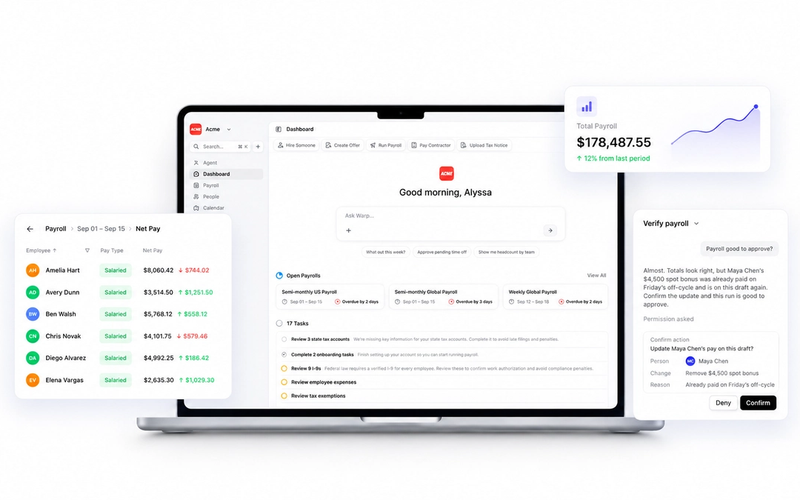
Warp is the only AI-native HR & Payroll platform built for ambitious companies. Instead of clicking through clunky dashboards or .gov websites for taxes, Warp's AI agents open every state tax account, file every payroll form, and resolve every tax notice, automatically.
On the specific problem of paperless HR, that shows up as a few concrete features rather than a bolt-on e-signature tool:
Warp Offers sends candidates a visual, branded offer letter instead of a wall of legalese, and every signature carries the signer's IP address, device, and browser information. Once signed, the offer files directly into the employee's record, no separate step required.
I-9 verification runs the same way: eligible employees complete Section 1 and upload their identity and work authorization documents in Warp, employers review and complete Section 2, and Warp generates a federally compliant Form I-9 to retain. Admins can see who still needs to act, and every step is logged.
Company documents and policies work the same way training does everywhere else in Warp: admins upload a handbook or policy once, assign it (including automatically to new hires as part of onboarding), and Warp captures and timestamps every employee's acknowledgment. When someone asks for proof later, it's already there.
Because all of this runs inside the same platform that handles payroll and HRIS, a signed offer, a verified I-9, and an acknowledged handbook all land in one employee record instead of three disconnected systems.
Here’s a tour of Warp’s I-9 Employer Verification:
Interested in learning more? Book a demo.
FAQ Section
What is paperless HR software?
Paperless HR software replaces physical HR paperwork (offer letters, I-9s, handbooks, personnel files) with digital versions that are signed, stored, and tracked electronically. The strongest tools connect these documents to a single employee record instead of storing them in separate systems.
How long do I need to keep digital HR records?
Retention periods vary by document type and jurisdiction. I-9s, for example, must be kept for three years after the hire date or one year after termination, whichever is later. Tax records and benefits documents often have separate, longer retention requirements, so check the specific rules for each document type rather than applying one retention policy across the board.
Can I do I-9 verification remotely and still be compliant?
Yes, but the timing and documentation requirements still apply. Employers must still complete Section 2 within three business days of the employee's start date, and specific verification procedures apply to remote and hybrid teams. Our guide on remote I-9 verification covers the details.
What's the difference between paperless HR and an HRIS?
An HRIS (HR information system) is the broader system of record for employee data. Paperless HR document handling, offers, I-9s, and acknowledgments are one function within it. Ideally, they're the same platform, so documents automatically become part of the employee record instead of living in a separate tool.
Disclaimer: Retention rules can change and vary further by state and document type. Confirm current requirements with counsel or a compliance advisor before finalizing your retention policy.