
TL;DR:
- Most "payroll software for accountants" ends up meaning software that hands you a CSV and calls it integration. The better question is whether the journal entries post themselves.
- Look for automatic journal entry sync, multi-entity support, actual state tax handling, and one screen that shows sync status across every client, not five tabs.
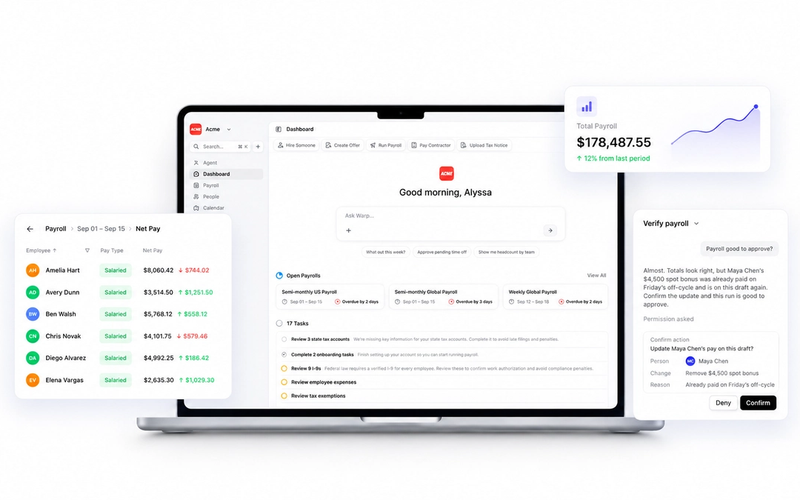
- Warp's Accounting page gives you sync status and journal reports for every connected client in one view, with native posting to QuickBooks, Xero, NetSuite, and Rillet.
If you're an accountant or bookkeeper evaluating payroll software, you're usually solving one of two different problems that happen to share the same search term. Either you're picking the payroll system your own firm runs on, or you're vetting what a client should switch to (or is already using) so you're not stuck reconciling their books by hand every month. The good news is that the features that matter are mostly the same either way.
Why the reconciliation gap is the real problem
Ask any bookkeeper what they actually dislike about client payroll, and it's rarely the payroll calculation itself. It's the gap between when payroll runs and when it shows up correctly in the general ledger. Many platforms export a CSV, post one lump-sum entry that hides wages, taxes, and benefits in a single line, or sync to only one accounting platform and leave you to do the rest by hand for every other client.
We hear this constantly on calls with founders and the accountants who support them. One prospect, describing their existing provider's export, put it plainly: "They post 30 journal entries, or now 70 journal entries, in my books, which drives me insane." Another described the same problem in blunter terms: "It's the journal entries that are killing us from a time standpoint. It's just taking a ton of time."
Multiply that by a book of 20 or 30 clients, each running payroll on a different schedule, and reconciliation stops being a monthly task and starts being a permanent one.
What to actually look for in payroll software for accountants
- Automatic, itemized journal entries, not CSV exports. The entry should break out wages, taxes, benefits, and employer costs with correct account codes, not dump everything into one number you have to unpack yourself.
- Support for the accounting platforms your clients actually use. QuickBooks and Xero cover most small businesses, but if you work with anyone past Series A, you'll eventually need NetSuite for multi-subsidiary posting, or a newer AI-native ledger like Rillet or Puzzle.
- Multi-entity and class or department mapping. If a client has more than one subsidiary, or wants payroll costs split by department, location, or project, the integration needs to support that mapping natively instead of forcing a manual workaround.
- Real multi-state tax handling, not just tax calculation. Plenty of payroll software calculates withholding correctly. Far fewer will actually open the state tax accounts, file the registrations, and respond to the notice that shows up eight months later. That gap is where you end up doing unpaid compliance work for a client who assumed the software covered it.
- One screen for sync status across every client. If you have to log into each client's payroll account separately to check whether last month's run made it into the ledger, that's an hour a week you're not billing for.
- A human you can actually reach. When a client's payroll journal doesn't match what you expected, you want a person who can explain why, not a ticket queue.
How Warp handles the reconciliation gap
For accountants and bookkeepers, the part worth knowing about Warp is this: a single screen shows every payroll run, whether each one has synced to the connected accounting platform, and every journal report is available for download. You can bulk-sync payrolls from that same screen, and if a client hasn't connected an accounting platform yet, the page walks them through it instead of leaving you to figure it out.
The integrations behind that page are built for exactly the reconciliation problem above:
- QuickBooks: Automatic, itemized journal entries after every payroll run, mapped by department, location, or class, with real-time sync so reconciliation doesn't require re-entering anything.
- Xero: Payroll journals post automatically with full account mapping and tracking categories, plus automatic bank reconciliation syncing and payroll liability tracking.
- NetSuite: Multi-subsidiary payroll posting with custom segments and inter-company journal entries, built for clients with more than one entity, and audit-ready records with line-item detail for compliance reporting.
- Rillet: Journal entries and multi-entity consolidation for clients running on an AI-native ERP.
- Sage Intacct: Payroll journals with dimension support for departments, locations, and projects.
- Puzzle: AI-categorized journal entries after every payroll run.
None of that requires you to export anything or manually re-key a single number. Set the account codes and account mapping once, and every subsequent payroll run posts itself.
What changes for the clients you support
The state tax side matters just as much for the accountants sitting between founders and tax agencies. When a client hires in a new state, Warp opens the required tax accounts automatically instead of leaving that on your desk. Recurring filings, quarterly 941s, state unemployment reports, W-2s, W-3s, and 1099s get prepared and filed without a founder or their bookkeeper needing to track a deadline calendar. When a tax notice does arrive, Warp handles the response directly with the agency rather than forwarding a PDF and hoping someone knows what to do with it.
That matters for you specifically because a lot of the informal compliance work accountants absorb for clients — the notice nobody can read, the state registration nobody remembered to file, the deadline that snuck up — is the exact work Warp's agents are built to take off the table. Every company on Warp also gets a dedicated Account Manager and Benefits Advisor, so payroll setup and multi-state questions have a named point of contact who isn't you.
FAQ
Does Warp integrate directly with QuickBooks and Xero?
Yes. Warp posts itemized journal entries to both platforms automatically after every payroll run, with account mapping by department, location, or class, so nothing needs to be exported or re-entered by hand.
What do accountants use instead of QuickBooks for payroll on multi-subsidiary clients?
For clients running multiple subsidiaries or entities, NetSuite is the more common general ledger, and Warp's NetSuite integration supports multi-subsidiary posting, custom segments, and inter-company journal entries natively.
Can I see the sync status for all of my clients' payrolls in one place?
Yes. Warp's Accounting page shows every payroll run, its sync status against the connected accounting platform, and every journal report available to download, with the option to bulk-sync payrolls that haven't posted yet.
Do CPA firms still need to manually handle state tax registrations if a client is on Warp?
No. When a client hires an employee in a new state, Warp automatically opens the required state tax accounts and handles the ongoing filings, so that work doesn't land on the accountant or bookkeeper by default.