
Payroll used to be an operational checkbox. Today it is a systems decision with real financial and legal consequences. Growing US companies are managing more complex workforce structures, multi-state tax obligations, and employee expectations that legacy payroll tools were never built to handle. That is why finance and HR leaders are increasingly evaluating AI payroll solutions, not as a productivity experiment, but as a compliance and operational infrastructure upgrade.
The problem is that the market has flooded with “AI-powered” payroll claims that are difficult to evaluate. Some vendors have genuinely rebuilt their platforms around intelligent automation, anomaly detection, and adaptive compliance monitoring. Others have bolted a chatbot onto a 2015 workflow engine and called it AI. For a CFO or people ops leader making a decision that affects every employee’s paycheck and the company’s regulatory standing, that distinction is not academic.
The real question is not which payroll software has the most AI features. It is which platform you can actually trust when a multi-state payroll run closes on a Friday.
This guide is written for finance and HR leaders who are past the awareness stage and actively evaluating AI payroll solutions. If you are still setting up payroll for the first time, Warp’s complete startup payroll guide covers the foundational steps. For teams already running payroll and looking to upgrade, read on. This article covers:
- What actually separates AI-native payroll from traditional payroll software
- The evaluation criteria that matter most for compliance, accuracy, and operational fit
- The hidden costs of choosing the wrong system
- How to structure a low-risk implementation rollout
- The questions buyers should ask any vendor before signing
The goal is not to give you a ranked list. It is to give you the framework to make a decision you can defend.
AI-Native Payroll vs Traditional Payroll Software: What Actually Changes
The term “AI payroll” gets applied to a wide range of products. To evaluate vendors honestly, it helps to understand what the architecture difference actually means in practice.
Traditional payroll software automates fixed workflows: calculate gross pay, apply tax withholdings, generate payslips, file reports. It is rules-based. When rules change (a new state minimum wage, a federal tax table update), the system requires a manual update or vendor patch. When an anomaly appears, a human has to catch it. When something breaks, the fix is reactive.
AI-native payroll platforms add a layer of intelligence on top of that core processing. The meaningful capabilities are not chatbots or dashboards; they are anomaly detection that flags issues before a payroll run closes, automated compliance monitoring that adapts to regulatory changes in real time, and predictive checks that surface errors at data entry rather than at audit. Gartner’s 2025 payroll technology outlook found that AI enables real-time validation at data entry, automated regulatory monitoring, and continuous anomaly detection for fraud — capabilities that fundamentally shift payroll from reactive administration to proactive financial control.
The distinction that matters most for buyers is not whether a vendor says “AI.” It is whether the system reduces your exposure before problems occur.
| Capability | Traditional Payroll Software | AI-Native Payroll |
|---|---|---|
| Error detection | Post-run manual review | Real-time at data entry |
| Compliance updates | Manual patches or vendor updates | Automated regulatory monitoring |
| Anomaly flagging | Human-identified | AI-flagged before run closes |
| Audit trail | Static logs | Continuous, evidence-linked records |
| Multi-state handling | Rules-based configuration | Adaptive across jurisdictions |
| Reporting | Scheduled reports | Real-time visibility and forecasting |
| Human oversight | Central to every step | Structured, with AI-assisted review |
One data point worth anchoring on: ISG Research projects that by 2028, half of all enterprises will use payroll platforms that use AI to identify mistakes and omissions before managers need to intervene. The shift is not theoretical. But the pace of adoption also means buyers need to be careful about what they are actually buying.
Key takeaway: The meaningful AI payroll upgrade is not about interface modernization. It is about catching errors earlier, adapting to compliance changes faster, and giving finance teams better visibility into payroll risk before it becomes a problem.
What CFOs and HR Leaders Should Evaluate Before Choosing an AI Payroll Solution
Most payroll software demos look good. The real evaluation happens when you move past the UI and start asking about controls, integrations, and what happens when something goes wrong. Here is the framework that separates a well-marketed tool from a platform you can actually rely on.
The Six Evaluation Categories That Matter
1. Compliance automation and jurisdiction coverage Can the platform automatically track and apply regulatory changes across every state where you have employees? Multi-state payroll is one of the highest-risk areas for growing companies. Ask specifically about how the system handles new state registrations, local tax rules, and mid-year regulatory changes. Require documentation, not a verbal assurance.
2. Audit trail quality Every payroll action should generate a timestamped, evidence-linked record. Static logs are not enough. You need a system that can show, at any point, who approved what, what data triggered a calculation, and what changed between runs. Finance leaders should think of this as the payroll equivalent of version control.
3. Integration depth with HR, finance, and identity systems Payroll does not run in isolation. Your AI payroll platform needs clean, bidirectional integration with your HRIS, general ledger, benefits administration, and identity management tools. Shallow integrations that require manual data exports create exactly the kind of reconciliation work you are trying to eliminate. If you use Okta, confirm native support before the contract stage. Warp’s integrations page lists native connections across HRIS, accounting, and identity tools.
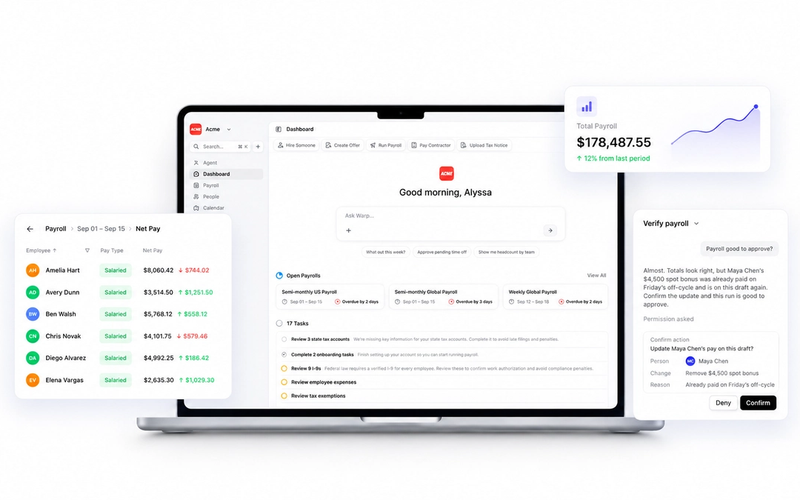
4. First-pass accuracy and exception handling Ask vendors how they measure payroll accuracy and what their exception handling workflow looks like. Strong platforms will have clear answers about how errors are flagged, who gets notified, and how quickly issues are resolved before a run closes. A system that catches errors but buries the alert is not useful. For example, Warp's AI agents run pre-run anomaly checks and surface flagged items directly in the payroll dashboard before a run closes, so exceptions are visible and actionable in real time rather than buried in a log.
5. Data security and compliance certifications Payroll data is among the most sensitive information a company holds. Also ask about role-based access controls, encryption at rest and in transit, and how the vendor handles breach notification. According to IRIS Global, a payroll data breach can cost between $2,500 and $7,500 per individual affected.
6. Human override controls and governance This is one of the most important evaluation criteria. A good AI payroll platform should give your team clear visibility into what the system is doing and a straightforward path to review and approve before a run closes. Ask vendors how their approval workflow is structured and what happens when a flagged item needs human review. Warp's AI agents log every action with a full audit trail. When a tax notice is triaged, a rate is updated, or a compliance change is applied, the system records what happened and why. That level of visibility is the baseline you should expect from any vendor.
What Finance Leaders Need to See
- Quantified first-pass accuracy rates, not just “high accuracy” claims
- A documented exception management workflow
- Total cost of ownership modeling, including implementation, integration, and ongoing admin
What HR and People Ops Leaders Need to See
- Employee self-service quality and how the system handles pay inquiries
- How the platform supports onboarding, offboarding, and mid-cycle changes
- Whether the vendor has a track record with companies at your headcount and growth stage
The Hidden Costs of Choosing the Wrong Payroll System
Entry-level pricing is one of the least reliable signals in a payroll software evaluation. A platform that costs less per employee per month can easily become the more expensive option once you account for what it does not do well.
The compliance cost most buyers underestimate: Noncompliance with US payroll regulations costs companies an average of $845 per employee per year, according to payroll compliance research. For a 100-person company, that is $84,500 in annual exposure from penalties, corrections, and remediation work, before accounting for the internal time cost of managing those issues.
Where the Real Costs Accumulate
Integration failures. A payroll system that does not integrate cleanly with your HRIS or general ledger forces manual data reconciliation every pay period. That work is invisible in a vendor demo but very visible in your finance team’s weekly hours.
Re-runs and corrections. Payroll errors that are not caught before a run closes require off-cycle corrections. Each one carries administrative cost, potential penalty exposure, and employee trust damage. AI payroll tools that reduce exceptions by 30-60% (per Gartner) are not just more efficient; they are eliminating a category of recurring cost.
Employee support volume. Pay-related employee inquiries are one of the highest-volume support burdens for HR teams. Research shows that AI-assisted payroll systems can reduce employee support cases by up to 36%. A platform that does not offer strong self-service and intelligent inquiry handling shifts that load back onto your people ops team.
Skills gaps and transition costs. 72.7% of payroll professionals cite the fast pace of AI technology as a major challenge. A platform that requires significant retraining or specialist knowledge to operate creates ongoing operational risk, especially at companies where the payroll function sits with a small team or a generalist HR lead.
| Cost Category | Traditional System Risk | AI-Native System Advantage |
|---|---|---|
| Noncompliance penalties | High ($845+/employee/year avg) | Reduced via automated monitoring |
| Manual reconciliation | Frequent, especially with integrations | Minimized with native connectors |
| Off-cycle corrections | Common with post-run error detection | Reduced with pre-run anomaly flagging |
| Employee support cases | High volume, HR-absorbed | Up to 36% reduction with self-service AI |
| Implementation complexity | Lower upfront, higher long-term | Higher upfront, lower ongoing |
How to De-Risk Implementation: A Phased Rollout Plan
The most common AI payroll implementation mistake is treating it like a software swap. You pick a vendor, set a go-live date, and migrate. That approach works fine for low-stakes tools. Payroll is not a low-stakes tool.
A phased rollout reduces the risk of compliance gaps, data migration errors, and operational disruption during the transition. If you are switching from an existing provider, Warp’s step-by-step guide to switching payroll providers covers the migration process in detail. Research from payroll implementation specialists suggests a structured three-phase approach spanning 13 to 26 months for full deployment with governance in place. Most growing companies can move faster than that, but the phase sequence matters regardless of timeline.
Phase 1: Data Foundation (Months 1-3)
Before any AI feature is useful, the underlying data has to be clean and connected. This phase is unglamorous but critical.
- Audit your current payroll data for accuracy: employee classifications, pay rates, tax registrations, benefits elections
- Map every integration point: HRIS, general ledger, identity management (e.g., Okta), benefits platforms
- Identify multi-state tax obligations and confirm the new platform handles each jurisdiction
- Establish baseline metrics: current error rate, exceptions per pay period, average time to close a payroll run
- Confirm data security requirements and complete vendor security review
What good looks like at the end of Phase 1: Clean data, confirmed integrations, documented baseline, and a signed-off integration architecture before any live payroll runs on the new system.
Phase 2: Pilot and Validation (Months 3-6)
Run the new system in parallel with your existing process for at least one full pay cycle before cutting over. This is not optional.
- Run parallel payroll to compare outputs and catch discrepancies
- Enable AI features incrementally: start with anomaly detection and pre-run checks before activating automated compliance monitoring
- Define escalation paths: who reviews flagged items, how overrides are documented, what triggers a manual review
- Measure against the Phase 1 baseline to confirm accuracy improvements
- Train the payroll and HR team on exception handling, not just the UI
Phase 3: Scale and Govern (Months 6-12+)
Once accuracy and exception benchmarks are met, extend the platform’s scope and formalize governance.
- Expand to full payroll ownership on the new system with documented approval workflows
- Activate reporting, forecasting, and cross-functional visibility features for finance leadership
- Establish a quarterly payroll audit process using the platform’s audit trail
- Define ownership: who is accountable for payroll accuracy, compliance sign-off, and vendor escalation
| Phase | Timeline | Focus | Success Signal |
|---|---|---|---|
| 1: Data Foundation | Months 1-3 | Data audit, integration mapping, security review | Clean data, confirmed integrations |
| 2: Pilot and Validation | Months 3-6 | Parallel runs, AI feature activation, team training | Error rate at or below baseline |
| 3: Scale and Govern | Months 6-12+ | Full ownership, governance, reporting | Audit-ready, exception rate down 30%+ |
A note on timeline: The phased framework above reflects a conservative enterprise migration from a legacy system. AI-native platforms built for faster onboarding compress this significantly. Warp customers typically go live within one to two weeks with white-glove migration support that includes YTD data transfer, state tax account setup, and finance stack sync. The phase sequence still matters for governance, but the calendar shrinks when the platform is purpose-built for it.
FAQs: Common Questions Buyers Ask About AI Payroll
Is AI payroll safe for a compliance-sensitive company?
Yes, if you choose a platform with the right controls in place. The key is not avoiding AI; it is ensuring the system has a strong audit trail, human override capability, and documented compliance monitoring. AI payroll platforms that surface errors before a run closes are, in practice, safer than traditional systems that rely on post-run human review. The risk is not the AI itself. The risk is choosing a platform where the AI operates without visibility or governance.
Does AI payroll replace the payroll team?
No. SHRM research shows that 87% of CHROs expect AI to boost workforce productivity by freeing teams from manual tasks, not by eliminating roles. In practice, AI payroll shifts your team’s work from data entry and reconciliation toward exception review, compliance oversight, and strategic reporting. The payroll function becomes more valuable, not redundant. That said, only 18.7% of employees are currently very comfortable with AI handling pay calculations entirely on its own, which means maintaining clear human accountability in the process is not just good governance; it is also a trust issue worth managing carefully.
How does AI payroll pricing typically work, and what should I budget?
Pricing varies by company size and feature scope. For small to mid-sized companies in the US, AI payroll platforms typically run between $200 and $900 per month for smaller teams, scaling to $3,000 to $7,500 per month for mid-market organizations with more complex needs. Most vendors price on a per-employee-per-month basis with a platform fee. The more important number is total cost of ownership: add implementation costs, integration work, training time, and the ongoing admin burden. Predictive AI tools have been shown to cut unexpected payroll costs by up to 23%, which should factor into your ROI calculation alongside the headline license fee.
How do I evaluate whether a vendor’s AI claims are real?
Ask for specifics. “AI-powered” is not a meaningful claim. Ask: What is your first-pass gross-to-net accuracy rate? How does your system detect anomalies, and at what point in the payroll cycle? Can you show me an example audit trail? What happens when a regulatory change occurs, and how quickly does the platform adapt? Require trust and safety documentation and ask for customer references at companies with a similar headcount, multi-state footprint, and tech stack. Vendors with genuine AI capabilities will answer these questions confidently. Vendors with surface-level AI will redirect to the demo.
What is a realistic payback period for switching to AI payroll?
Most organizations see measurable ROI within one to three quarters of full deployment. That includes reduced error-correction time, lower compliance remediation costs, and fewer off-cycle payroll runs. The payback accelerates as headcount grows, because the efficiency gains from AI scale with volume in ways that manual processes do not.
The Best AI Payroll Solution Is the One You Can Trust Under Real Operating Conditions
Every AI payroll vendor will show you a clean demo. The question is what happens on the first Friday when a multi-state payroll run closes with a flagged anomaly and your team needs to override, document, and re-approve before the wire goes out.
The companies that make good payroll decisions evaluate on that scenario, not the demo. They ask about controls, not just features. They pressure-test integrations before go-live. They require audit trail documentation before signing. And they choose a vendor that can grow with them as headcount, compensation complexity, and compliance obligations scale.
The Buyer’s Checklist Before You Sign
- Documented approach to payroll accuracy measurement and exception handling
- Native integrations with your HRIS, GL, and identity management tools
- Demonstrated audit trail with evidence-linked records
- Multi-state compliance monitoring with documented update process
- Customer references at comparable headcount and growth stage
- Total cost of ownership modeled across at least 24 months
- Phased implementation plan with defined go-live criteria
Payroll is not the place to bet on a vendor’s roadmap. It is the place to evaluate what the platform does today, how it handles exceptions, and whether your team can maintain control of a process that every employee in the company depends on every pay period.
Warp is built for exactly this evaluation. It is an AI-native payroll, compliance, and benefits platform designed for growing US companies that need automation they can trust, controls they can audit, and a team that understands what is at stake when payroll has to be right. You can review Warp's security practices, data handling policies, and compliance posture on its Trust & Safety page. You can also explore Warp's multi-state payroll compliance guide to see how the platform handles one of the most complex areas of US payroll.
Book a demo with Warp to see how AI-native payroll works in practice, and bring the checklist above to the conversation.