
How to Migrate from Mosey to Warp in Under 10 Minutes
Gusto acquired Mosey on April 9, 2026. If you're not on Gusto payroll, your Mosey compliance platform ends on June 30, 2026. That gives you approximately 82 days to find a new compliance provider, migrate your data, and make sure nothing falls through the cracks.
We've already heard from dozens of Mosey customers since the announcement. The most common question: how hard is this going to be?
The answer: not hard at all. Most startups complete the migration to Warp in under 10 minutes of hands-on time. Warp's migration team handles the other 40+ hours of work — tax agency registrations, historical data import, benefits coordination, and compliance verification across every state where you have employees.
This guide walks you through exactly what happens when you migrate from Mosey to Warp, step by step. Whether you're moving just compliance or your entire payroll stack, we'll cover what Warp handles, what you provide, and the timeline to go live. (Not sure Warp is the right fit? Read our comparison of the best Mosey alternatives first.)
Before You Start: Get Your Mosey Transition Packet
Mosey confirmed they'll provide every departing customer with a transition packet containing your account data, compliance status, and filing history. This packet is the single most important thing to request before you begin your migration.
Here's what you should confirm is included:
- State registration numbers for every state where you have employees
- Filing history — quarterly returns, annual reports, and any in-progress filings
- Open items — pending registrations, unresolved tax notices, and upcoming deadlines
- Compliance calendar — a list of every recurring obligation and its next due date
- Entity compliance data — foreign qualifications, registered agent information, and Secretary of State filings
Request your packet now. Don't wait for Mosey's Customer Success team to reach out in the coming weeks. The earlier you have this data, the smoother the migration. If you need help understanding what's in your packet, our team will walk through it with you during the kickoff call.
If you have open items — registrations in progress, notices being resolved, or filings that haven't been submitted — get written confirmation from Mosey on whether those will be completed before your access ends. This is the compliance gap that nobody talks about, and it's the one that creates penalties. (For a deeper look at the compliance implications, read Mosey Got Acquired by Gusto. Now What? by our CEO.)
Step 1: Sign Up and Schedule Your Kickoff Call (5 Minutes)
Go to warp.co/qualification and fill out the short form. Mention that you're migrating from Mosey — our team prioritizes these migrations given the June 30 deadline.
Within 24 hours, you'll be matched with a dedicated migration specialist who handles your transition end to end. This isn't a generic onboarding flow. Your migration specialist will:
- Review your Mosey transition packet and flag any gaps
- Map your current compliance obligations to Warp's platform
- Create a migration plan tailored to your company's state footprint
- Coordinate with your existing payroll provider if you're moving payroll too
The kickoff call takes about 30 minutes. After that, your hands-on time is minimal — Warp handles the heavy lifting.
What you need for the kickoff call:
- Your Mosey transition packet (or whatever compliance data you have)
- Employee roster (CSV export or HRIS connection)
- Recent payroll reports (your migration specialist will tell you exactly which ones)
- Current benefits enrollment data (if you're moving benefits to Warp)
- Signing authority for tax agency transfers
That's the bulk of what you provide for the entire migration. Most companies spend under 2 hours total. Warp handles the other 40+ hours of work.
Step 2: Warp Migrates Your Data (Week 1-2)
Once you've completed the kickoff call, Warp's migration team takes over. Here's what happens behind the scenes.
What Warp Handles
Tax agency registrations across all 50 states. We transfer or open state and federal tax accounts in every jurisdiction where you have employees. If Mosey had registrations in progress that weren't completed, we pick those up. No forms for you to file, no .gov websites to navigate.
Historical data import and validation. Your employee data, pay history, and tax information are imported into Warp. We validate everything against your payroll reports to make sure nothing is missing or mismatched.
Benefits carrier coordination and transitions. If you're bringing benefits to Warp, we establish connections with your carriers and ensure there's no gap in coverage. Warp integrates with major benefits providers including Human Interest, Accrue 401k, and Vestwell for 401(k), plus health insurance carriers nationwide.
Payroll calendar and schedule configuration. Your pay schedule, deduction timing, and payroll calendar are configured to match what your employees expect. No surprises on payday.
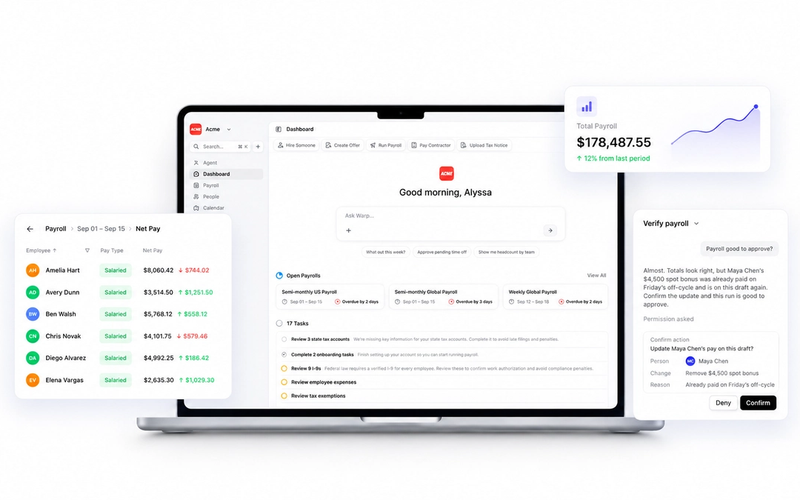
Employee self-service portal setup. Every employee gets access to Warp's portal where they can view pay stubs, update direct deposit information, access tax documents, and manage their benefits. Employee invites are sent automatically.
Multi-state compliance verification. Once your data is imported, we run a full compliance check across every state to ensure all registrations are active, all filings are current, and there are no gaps from the Mosey transition. This is the step that prevents penalties.
The Migration Timeline
Most migrations complete in 1-2 weeks. Here's what each stage looks like:
Week 1: Discovery & Setup. Kickoff call with your dedicated migration specialist. You connect your existing payroll system so we can export your data. Warp reviews your setup and creates a detailed migration plan tailored to your situation.
Week 2: Data Migration. Our team imports your employee data, pay history, and tax information. We transfer or open state and federal tax accounts, and establish connections with your benefits carriers.
Week 3: Verification & Go-Live. Before your first payroll, we run verification checks to ensure everything is accurate. You can optionally run a parallel payroll for extra confidence. Once you approve, your employee portal goes live and you're running on Warp.
After go-live, you get dedicated support for your first 90 days. Our team monitors your first several payroll runs to ensure everything is working correctly, and we help you sunset your previous provider when you're ready.
Step 3: Verify Your Compliance Transferred Cleanly
This is the step most migration guides skip — and it's the most important one for Mosey customers specifically.
When you're migrating compliance (not just payroll), you need to verify that every obligation transferred. Here's your checklist:
Confirm active registrations in every state. Warp's platform shows you a real-time view of your state tax registrations — unemployment insurance, withholding, and Secretary of State filings. Cross-reference this against your Mosey transition packet to make sure nothing was missed.
Check for in-progress items. If Mosey had filings pending or notices being resolved when you left, confirm those were either completed by Mosey or picked up by Warp. This is where compliance gaps happen.
Review your compliance calendar. Warp automatically tracks every upcoming deadline — quarterly filings, annual reports, license renewals — across all jurisdictions. Verify that the deadlines match what Mosey was tracking.
Confirm notice resolution is active. Warp's AI agents monitor for tax notices from 800+ US tax agencies and resolve them automatically. The IRS reports that 40% of small businesses face payroll tax penalties each year — most of which come from notices that went unaddressed. Make sure this monitoring is active from day one.
Warp's team handles this verification with you. You're not checking boxes alone — your migration specialist walks through every item before signing off.
What Makes Migrating to Warp Different from Other Options
If you're evaluating multiple Mosey alternatives, here's why the migration experience with Warp is different.
Warp handles the migration for you. This isn't a DIY process where you export CSVs and re-enter data into a new platform. Warp's migration team does the work. Your total hands-on time is under 2 hours.
Compliance continuity, not just data transfer. Most migration tools move your data. Warp moves your data and ensures your compliance obligations continue without gaps. No missed filings, no lapsed registrations, no penalties during the transition.
AI-native compliance from day one. Where Mosey's services team handled compliance tasks on your behalf, Warp's AI agents handle them automatically. State tax accounts open when you hire in a new state. Quarterly filings submit on schedule. Tax notices are parsed, resolved, and documented — often before you know they existed. The difference is architectural: Warp is product-driven compliance, not services-driven. (Read more about why this distinction matters.)
If Warp makes a mistake, Warp pays. Compliance errors during a migration are the nightmare scenario. Warp takes financial responsibility for compliance mistakes — the penalty is on us, not on you. Mosey didn't offer that, and Gusto's standard terms don't either.
Your existing integrations stay connected. Warp integrates with QuickBooks, Xero, NetSuite, and Sage Intacct for accounting. Okta, Google Workspace, and JumpCloud for SSO. Slack, Checkr, Vanta, and Next Insurance for everything else. During migration, we configure your integrations so payroll data flows automatically to the systems you already use. No manual exports, no reconciliation headaches. (See the full integration list.)
No payroll switch required. If you want to keep your current payroll provider and only migrate compliance, Warp supports that. Unlike the Gusto-Mosey bundle, you're not forced to change your entire payroll stack to maintain compliance coverage. (Not sure whether to move payroll too? Read our guide to setting up payroll to understand what's involved.)
Migration Checklist: Mosey to Warp
Here's your complete checklist for migrating from Mosey to Warp before the June 30 deadline.
Now (April 2026):
- Request your transition packet from Mosey — don't wait for them to reach out
- Get written confirmation on any open compliance items (pending registrations, unresolved notices)
- Sign up at warp.co/qualification and mention you're migrating from Mosey
May 2026:
- Complete your kickoff call with your Warp migration specialist (30 minutes)
- Provide employee roster, recent payroll reports, and benefits data
- Warp begins data migration and state tax registration transfers
Early June 2026:
- Verify all state registrations are active in Warp
- Cross-reference your compliance calendar against Mosey's transition packet
- Run parallel payroll (optional) for verification
- Approve go-live
June 30, 2026 — Mosey cutoff:
- You're fully operational on Warp with zero compliance gaps
- Dedicated support continues for your first 90 days
- Warp's AI agents are monitoring multi-state compliance across all jurisdictions
The key is starting now. State registrations can take 5-10 business days, and you want buffer time to verify everything transferred correctly. Companies that wait until June will face compressed timelines and higher risk of compliance gaps.
Who's Already Made the Switch
Warp is the platform of choice for high-growth, fast-moving startups. Here are companies that switched from other providers:
Bland AI — switched from Rippling to handle rapid growth. Their COO Sobhan Nejad said the difference was striking — they needed something that could keep up with scaling without breaking down.
Paraform — switched from Gusto to scale faster. If you're considering the Gusto-Mosey bundle, Paraform's experience is worth understanding: they left Gusto for a reason.
Reducto — set up payroll in 5 minutes. For Mosey customers worried about migration complexity, this is the reality for most startups on Warp.
Greptile — started with Warp from day one. Built their entire compliance infrastructure on a product-driven platform rather than a services model.
Companies using Warp report 95% of tax notices resolved automatically and over $100M+ in penalties avoided across the customer base. Our CSAT score is 5/5, and our US-based support team has a median response time of 1 minute.
Pricing: What to Expect
Warp's pricing is flat and transparent — no surprise charges when you add states or need compliance features.
Pro Plan: $89/month platform fee + $35/employee/month. Everything included — payroll, compliance, benefits administration, and a dedicated Account Manager.
Premium Plan: $129/month platform fee + $50/employee/month. Includes everything in Pro plus priority support and advanced features.
No implementation fees. No per-state charges. No module upsells. No annual contracts. Month-to-month, so Warp has to earn your business every month. View full pricing details.
For context: if you're evaluating the Gusto-Mosey bundle, remember that the 6 months of free payroll is a promotional offer. After that, you're on Gusto's standard pricing within their ecosystem. Warp's pricing is the same on day 1 as it is on day 180. (Wondering how Gusto compares overall? See our honest breakdown of Gusto alternatives.)
Frequently Asked Questions
How long does the full migration from Mosey to Warp take?
Most migrations complete in 1-2 weeks from kickoff to go-live. Your total hands-on time is under 2 hours — Warp's migration team handles the other 40+ hours of data import, tax registration transfers, benefits coordination, and compliance verification. The initial sign-up takes about 5 minutes, and the kickoff call is 30 minutes.
Can I migrate just compliance without switching payroll?
Yes. Warp's compliance automation works independently of payroll. You can keep your current payroll provider — whether that's Rippling, ADP, Paychex, or anyone else — and use Warp specifically for state registrations, quarterly filings, tax notice resolution, and multi-state compliance monitoring. Many Mosey customers are doing exactly this.
What happens to my compliance between leaving Mosey and going live on Warp?
This is why starting early matters. Ideally, you should have Warp monitoring your compliance before your Mosey access ends — not after. Quarterly filings and tax notices don't pause during vendor transitions. If you start the migration in April or May, you'll have full overlap coverage before the June 30 cutoff.
Do I need my Mosey transition packet to migrate?
It's helpful but not required. The transition packet makes the migration faster because it gives Warp's team a complete picture of your compliance status. If you don't have it yet, we can work from your payroll reports, state registration numbers, and other source documents. But we recommend requesting it from Mosey as early as possible.
What if Mosey has open items that aren't completed before June 30?
Warp picks up where Mosey leaves off. If you have pending state registrations, unresolved notices, or in-progress filings, our team will continue those items. Get written confirmation from Mosey on what's outstanding so we can ensure nothing falls through the cracks.
Is it too early to start the migration?
No — earlier is better. Starting now gives you maximum buffer time to verify everything transferred correctly. Companies that wait until June will face compressed timelines and higher risk of compliance gaps during the transition. The Mosey cutoff is a hard deadline, not a suggestion.
Can I switch mid-year without getting dual W-2s?
Yes. Warp handles mid-year transitions cleanly, including year-to-date tax data import, so your employees receive a single W-2 at year-end. No duplicate forms, no confusion.
What integrations does Warp support?
Warp integrates with QuickBooks, Xero, NetSuite, and Sage Intacct for accounting. Okta, Google Workspace, and JumpCloud for SSO. Human Interest, Accrue 401k, and Vestwell for 401(k). Plus Slack, Checkr, Vanta, and Next Insurance. During migration, we configure these integrations so data flows automatically.
Your compliance platform was just acquired. You have 82 days. Don't spend them worrying — spend 10 minutes starting the migration and let Warp handle the rest.
Start your migration today. Dedicated Mosey migration. Under 10 minutes to set up. 24-hour response.