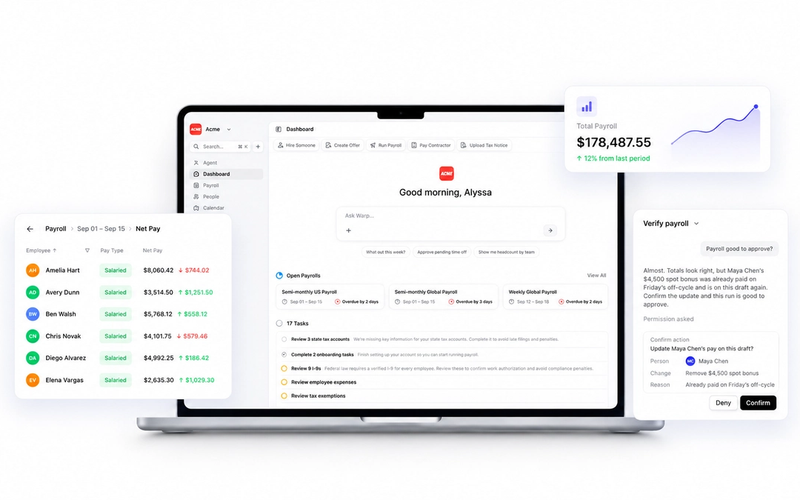

Your team runs payroll and HR from the Warp web dashboard. Now your employees can check their pay, log their hours, and manage their benefits from their phone. The Warp mobile app is live on iOS and Android, and it's built for one job: giving employees fast, focused access to the parts of Warp that matter to them.
TL;DR:
- The Warp mobile app is a worker self-service companion to the web platform, not a mobile version of the whole system.
- Employees can check paychecks, clock in and out, request time off, submit expenses, and view benefits, all from one app.
- It's now available on iOS and Android at no extra cost to Warp customers.
Warp App for Employees Tour
What Employees Can Do in the Warp App
Paychecks: Their Own Paycheck App
The Home tab is where most employees will spend their time. It shows the upcoming payday and pay period, full paycheck history and status, and a detailed breakdown of every paycheck: net pay, itemized earnings, taxes withheld, benefit contributions, and total post-tax deductions.
Contractors see a version built for them: payment history and payment details, without the employee-specific breakdowns that don't apply.
Shifts: Time Tracking That Matches How Your Team Works
Time tracking only appears in the app for employees whose company has an applicable time policy. From there, the experience adjusts to match that policy:
- Clock-based policies: Employees clock in and out and start and end breaks right from their phones.
- Geofenced policies: The app verifies the employee is at an approved workplace when they clock in. If someone clocks in from outside that location, stays outside past the grace period, or disables location monitoring, they can be warned or flagged for a manager to review.
- Timesheet policies: Employees log and edit hours manually instead of clocking in live.
- Hybrid policies: Employees get both manual timesheet entry and live clock in/out, depending on the shift.
Every employee can also view their current and past shifts and see the status of their timesheet at a glance. It's a straightforward time-tracking app for employees, scoped to exactly match the policy their employer has already configured on the Warp platform.
Expenses: Snap a Receipt, Skip the Spreadsheet
For US W-2 employees at companies with expense reimbursement enabled, the app supports photographing a receipt, selecting one from the photo library, or attaching a file directly. AI-assisted scanning automatically reads the amount, merchant, category, and date, so employees aren't stuck retyping numbers from a crumpled receipt.
Employees can track each submission through pending, approved, rejected, or paid-out status, and edit or delete a submission while it's still pending. Contractors and non-US employees don't have access to expense submission in the app because reimbursement rules vary by classification and country.
Time Off: Request It, Track It, See It
The Time Off tab gives employees a clear view of their policy details and current balances, so there's no guessing how many days they have left. They can filter and open their full request history, and submit a new time-off request without waiting to grab a manager in the hallway or dig up a form.
If your company has a PTO policy with accrual rules or state-specific requirements, the balances shown in the app automatically reflect that policy.
Benefits: Insurance Cards on Your Phone
Employees enrolled in healthcare coverage through Warp can see their plan details, member and group information, effective dates, and current coverage status right in the app. On iOS, supported insurance cards can be added directly to Apple Wallet, making the physical card in a wallet or purse optional.
For companies still working through plan selection, Warp's benefits guides cover how funding models and carrier options affect what employees will eventually see in this tab.
Built to Work Alongside the Web Platform
The mobile app isn't a replacement for the Warp web portal, and it isn't trying to be. Admins still run payroll, manage compliance, and configure policies from the web dashboard. Anything that needs a document, like a printable pay stub, still lives there too.
Think of the app as the fast, pocket-sized front door to the information employees check most often. It's especially useful for hourly and distributed teams who are rarely sitting in front of a laptop when they need to clock in, check a balance, or see if an expense got approved. That matters even more as companies expand across states and manage employees who may never set foot in a shared office.
Warp is the only AI-native HR & Payroll platform built for ambitious companies. Instead of clicking through clunky dashboards or .gov websites for taxes, Warp's AI agents open every state tax account, file every payroll form, and resolve every tax notice automatically.
Every company gets a dedicated Account Manager and Benefits Advisor included to guide them through payroll setup, multi-state expansion, and benefits selection — so you don't have to spend hours on hold with tax agencies or worry about compliance mistakes.
With Warp, you'll never visit a government website, negotiate with tax agencies, or pay accountants $150 per filing. Just focus on building your business while Warp handles payroll, compliance, and benefits for your team across any state or country.
Thousands of fast-growing startups trust Warp to stay compliant while they scale.
The mobile app is one more piece of that automation, built for the people on your team who just want to check a paycheck without logging into a full HR system.
Getting Started with the Warp Mobile App
There's nothing to configure to turn the app on. If your company runs payroll on Warp, employees can download the app for iOS or Android today, sign in with their existing Warp credentials, and start using it right away. Access to specific tabs, such as Shifts or Expenses, is determined by the policies and permissions already set up for that employee on the web platform.
Frequently Asked Questions
What can employees do in the Warp mobile app?
Employees can view upcoming paydays and paycheck history; clock in and out or log hours, depending on their company's time policy; submit and track expenses; request time off and check balances; and view their enrolled benefits, including adding insurance cards to Apple Wallet on iOS.
Is the Warp mobile app available for both iOS and Android?
Yes. The app is available on both platforms and works with an employee's existing Warp login. There's no separate account setup required.
Does the Warp app support geofenced time tracking?
Yes, for companies that use a geofenced clock policy. The app verifies an employee's location when they clock in and can flag or warn them if they clock in outside an approved workplace, remain outside past the grace period, or turn off required location monitoring.
Can contractors use the Warp mobile app?
Contractors can use the app to view their payment history and payment details. Other tabs, like Expenses and Benefits, are scoped to W-2 employees and don't apply to contractor accounts.
Is the Warp mobile app free to use?
Yes. The mobile app is included for every employee at a company that runs payroll and HR through Warp, at no additional cost.