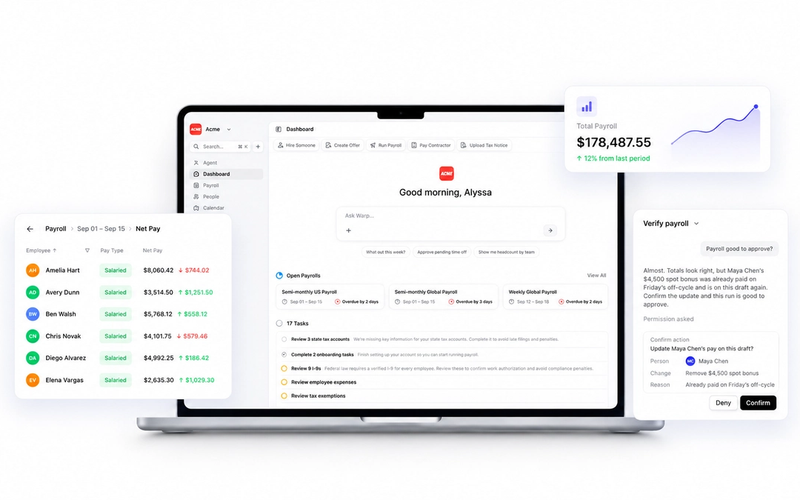

TL;DR: Most "payroll automation" only automates the math, not the work around it. Real automation should touch four things: calculations, tax filings, compliance monitoring, and notice resolution. If a platform still needs you to open a state tax portal or read an IRS letter yourself, that's not automation; it’s assistance with extra steps.
Key takeaways:
- Payroll automation and AI payroll agents are not the same thing. One calculates, the other executes.
- The bottleneck in most payroll cycles isn't the software. It's the data prep and cleanup around it.
- US payroll is uniquely hard to automate because it requires managing 51 different jurisdictional rule sets, not one.
- Six direct questions can tell you whether a vendor's "automation" actually executes work or just flags it for a human.
What payroll automation actually means
Payroll automation is software that calculates pay, taxes, and deductions without requiring someone to re-enter the same numbers three different ways. That's the textbook definition, and every major payroll provider automates this part. The math has been solved for two decades.
The problem is that "automation" gets stretched to encompass much more than math. A dashboard that flags a missed filing is not the same as a system that files it. A chatbot that answers "what's my tax rate in Ohio" is not the same as a system that registers you for an Ohio withholding account without you ever opening a browser tab.
Gartner estimated that, among thousands of vendors claiming to offer agentic AI, only about 130 are genuinely building the real thing. Warp's breakdown of agent washing in payroll software found that most vendors marketing "AI agents" in HR and payroll fall into four buckets: dashboards, chatbots, scheduled scripts, and alert systems. None of those execute work on their own. They make the work more visible, which is not the same thing as removing it.
The distinction comes down to a simple test: does the tool use action verbs, or passive ones? Genuine automation opens an account, files a form, resolves a notice. A relabeled version notifies you, surfaces a flag, or alerts your team. One does the work. The other tells you the work exists.
| Rules-based automation | Genuine AI agent | |
|---|---|---|
| Opening a new state tax account | Tells you to do it | Opens it for you |
| A tax notice arrives | Alerts a human to read it | Reads it and resolves it |
| Detecting a compliance gap | Flags it on a dashboard | Fixes it, then logs what changed |
| Running the payroll calculation | Automatic | Automatic |
What today's payroll automation actually automates
Ask ten payroll practitioners where their time actually goes, and you'll get the same answer: not the software. Warp interviewed practitioners across roles, from CEOs to bookkeepers, and the pattern held up: running payroll itself takes minutes. One CEO put it plainly: "The tedious part isn't running payroll. It's everything before it." One manager tracked six hours lost in a single week to administrative back-and-forth unrelated to the payroll software itself.
APQC benchmark data backs that up. The median payroll cycle takes three business days, not because the calculation is slow, but because of everything surrounding it: chasing hours, verifying changes, reconciling data pulled from three or four different systems before the payroll software ever sees clean numbers. Median first-time accuracy sits at 96%, and error rates above 0.5% almost always trace back to bad data going in, not a broken calculation engine.
That's the part most "automated payroll" software doesn't touch. It automates the math once data is clean. It doesn't automate cleaning the data first, and usually doesn't automate what happens after: compliance tasks, employment verifications, and off-cycle corrections that can turn a 20-minute fix into two hours.
Why automation gets harder once you're operating in the US
Strada's 2025 Global Payroll Complexity Index measures this. The US climbed 19 places in the ranking this year, jumping into the global top 10 most complex payroll countries for the first time, from 16th to 6th, with complexity up 17% year over year.
The reason is largely structural. Running payroll in the US means managing 51 separate systems, one per state plus DC, each with its own income tax rules, minimum wage levels, overtime formulas, garnishment protections, and pay-frequency requirements. A company operating in six states is effectively running six distinct payrolls with six sets of deadlines. California adds daily and double-time overtime rules on top of State Disability Insurance and Paid Family Leave deductions. New York triggers tax liability for non-residents after 14 days of work, turning time tracking into a compliance function rather than HR. Washington adds a long-term care payroll tax on top of no state income tax.
Automation is supposed to absorb that complexity. It often doesn't, because most systems were built to automate the math, not the jurisdiction-hopping around it. And the people who've historically covered that gap are retiring. Strada's research found 72% of organizations report a payroll talent shortage, with the average payroll manager now 48 years old, seven years older than the average employee. The knowledge built over decades of manually resolving state-by-state exceptions is walking out the door faster than most companies are replacing it with anything more sophisticated than another dashboard.
Automated versus autonomous payroll
This is where the agent-washing distinction stops being semantic and starts becoming expensive. Staying on the wrong payroll platform carries a real cost: the IRS issued 1.2 million civil penalties for payroll compliance failures in fiscal year 2025, and more than a million of those were specifically for late tax deposits. That's one in five of every civil penalty the IRS issued against a business that year.
Rules-based automation catches some of this. It can flag a missed deadline. What it generally can't do is register a new state withholding account without a human filling out the form, or read a tax notice and respond to it without a human interpreting what the agency actually wants. Six questions separate genuine automation from a relabeled dashboard:
- What happens when you hire your first employee in a new state? Does the system register the account, or do you have to?
- What percentage of payroll runs still require someone to step in manually?
- When a state tax notice arrives, does the system resolve it, or does it just alert someone to read it?
- Can you see an audit trail of what the system actually did, not just what it flagged?
- What's the documented first-pass filing accuracy, and who's tracking it?
- Which states or jurisdictions work with zero manual configuration?
If a vendor can't answer the first question with a verb like "opens" or "registers," you're looking at automation, not an agent. Warp's AI agents open every state tax account, file every payroll form, and resolve every tax notice, automatically.
That's a different design goal than automation layered on top of a legacy system. It's the same distinction Warp draws in its take on HR digital transformation: digitizing a broken process just makes the broken process faster. Transformation means asking whether a human needs to touch that step at all, then removing the step rather than speeding it up.
How to evaluate a payroll automation platform before you buy
Shopping for payroll software rarely includes time to read a 40-page comparison guide, so here's the short version. Before signing anything, check:
- What it actually executes versus flags. Ask the six questions above directly in a sales call, and pay attention to the verbs in the answer.
- How it handles your specific states. If you're hiring in California, New York, or Washington, ask what's automatic there specifically. Those states carry some of the heaviest compliance load in the country, per Strada's rankings.
- Who owns the exceptions. Even the best automation needs a human backstop for genuine edge cases. Find out whether that's a dedicated account manager or a shared support queue.
- What it costs when something goes wrong. Legacy platforms often charge per state filing or per correction. Warp's guide to setting up payroll walks through what a clean setup actually costs versus the add-on model most competitors use.
- How long switching actually takes. Fear of migration keeps companies on platforms that are quietly costing them 20 to 40% more than it should, mostly through gap-covering add-ons layered on top of a base plan.
FAQ
Is payroll automation the same as AI payroll?
No. Payroll automation typically means rules-based software that calculates wages, taxes, and deductions automatically. Genuine AI payroll goes further: it can take independent action, like registering a new state tax account or responding to a notice, without a human executing each step.
Why is US payroll automation harder than automation in other countries?
The US requires managing the equivalent of 51 separate tax and labor law systems, one per state plus DC. Strada's 2025 Global Payroll Complexity Index ranks the US 6th globally for payroll complexity, up from 16th the year before, driven largely by this jurisdictional patchwork.
What's the actual cost of getting payroll automation wrong?
The IRS issued 1.2 million civil penalties for payroll compliance failures in FY2025 alone, and over a million of those were for late tax deposits. Beyond penalties, most companies on outdated platforms overpay by 20 to 40% through add-ons that patch gaps the base platform doesn't cover.
How do I tell if a vendor is overselling their automation?
Listen for the verbs. Genuine automation "opens," "files," and "resolves." Marketing that leans on "notifies," "flags," or "surfaces" usually means a human is still doing the work. The software is just pointing at it.